Quick Answer
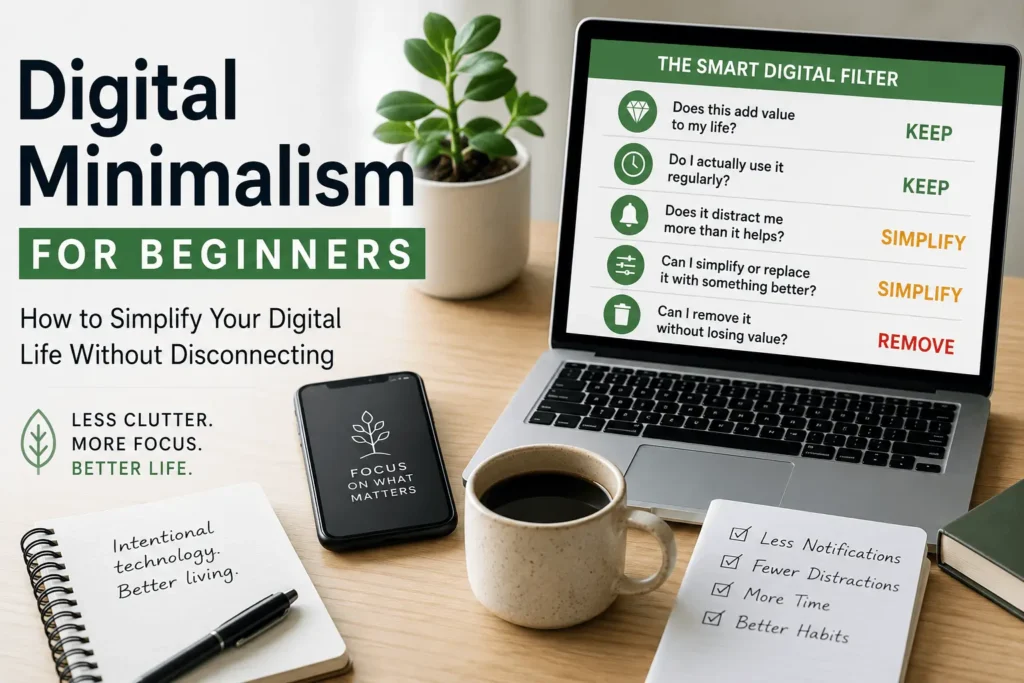
Digital minimalism is the practice of using technology more intentionally instead of letting it control your attention, time, and daily decisions. It isn’t about deleting every app or abandoning social media. It’s about keeping the digital tools that genuinely improve your life while reducing the distractions that don’t. In this guide, you’ll learn the Smart Digital Filter, a simple framework for deciding what to keep, what to simplify, and what to remove so technology works for you—not against you.
Is This You?
Imagine a typical day.
You unlock your phone to check one message.
A notification catches your attention.
You open social media “for just a minute.”
Someone shares a video.
You reply to a comment.
You check your email.
Another notification appears.
Twenty minutes later, you’ve forgotten why you picked up your phone in the first place.
Or maybe this sounds more familiar:
- Your inbox has thousands of unread emails.
- Your desktop is covered with random files.
- You have dozens of browser tabs open.
- Your phone is filled with apps you rarely use.
- Every notification feels urgent.
- You feel busy online—but not productive.
If any of these situations sound familiar, you’re not alone.
Modern technology gives us incredible convenience, but it also creates constant opportunities for distraction.
The good news is that you don’t need to stop using technology.
You simply need to start using it more intentionally.
That’s exactly what digital minimalism helps you do.
Quick Self-Check: Do You Need This?
Ask yourself honestly:
- Do you check your phone automatically, without a specific reason?
- Do you feel anxious or restless when your phone isn’t nearby or the battery is low?
- Do you open an app “for a minute” and look up twenty minutes later?
- Do real-life activities — conversations, hobbies, quiet moments — feel less engaging than scrolling?
- Has your sleep or stress level noticeably worsened alongside your screen time?
If you recognized yourself in three or more of these, the filters below will make the biggest difference for you specifically.
At a Glance
Best For
- Busy professionals
- Students
- Parents
- Remote workers
- Entrepreneurs
- Anyone who feels overwhelmed by technology
What You’ll Learn
✔ What digital minimalism really means
✔ Why your digital life feels overwhelming
✔ The Smart Digital Filter framework
✔ A practical 7-step digital declutter plan
✔ Simple habits to maintain a healthier digital life
Take Action Today
Before continuing, take one minute to look at your phone.
Ask yourself:
- How many unread notifications do I have?
- How many apps haven’t I used this month?
- How many browser tabs are open?
- How many unread emails are waiting for me?
Don’t change anything yet.
Simply become aware of your current digital habits.
Awareness is the first step toward meaningful change.
Digital Habit Snapshot
Without checking your phone first, answer these questions.
| Question | Your Answer |
|---|---|
| How many notifications do you usually receive in a day? | ______ |
| How many apps do you use every week? | ______ |
| How many unread emails do you currently have? | ______ |
| How many browser tabs are open right now? | ______ |
| How many times do you think you pick up your phone each day? | ______ |
Now check your devices.
Were your estimates accurate?
Many people are surprised to discover they use technology much more frequently than they realized.
Digital minimalism begins with awareness—not judgment.
Table of Contents
- What Is Digital Minimalism?
- Why Your Digital Life Feels Overwhelming
- The Smart Digital Filter
- A 7-Step Digital Declutter Plan
- Common Digital Minimalism Mistakes
- Digital Wellness Scorecard
- Signs Digital Minimalism Is Working
- Frequently Asked Questions
- Key Takeaways
- The 7-Day Digital Minimalism Challenge
Introduction
Technology has become part of almost everything we do.
We communicate through messaging apps.
We work on computers.
We manage our finances online.
We shop, learn, navigate, and even relax using digital devices.
Technology itself isn’t the problem.
The challenge is how easily it expands into every free moment of our day.
Notifications interrupt conversations.
Endless scrolling replaces intentional breaks.
Unread emails quietly create stress.
Dozens of apps compete for your attention.
Before long, your digital life begins to feel just as cluttered as a messy room.
Many people respond by trying a digital detox.
They delete apps, avoid social media for a weekend, or switch off their phones completely.
While that can provide temporary relief, it rarely creates lasting change.
Digital minimalism takes a different approach.
Instead of asking,
“How can I use technology less?”
It asks,
“How can I use technology more intentionally?”
That’s an important difference.
The goal isn’t to reject technology.
The goal is to make sure every digital tool has a purpose.
When your devices support your priorities instead of competing for your attention, technology becomes a helpful resource rather than a constant distraction.
In this guide, you’ll learn the Smart Digital Filter, a practical framework that helps you decide what to keep, what to simplify, and what to remove from your digital life.
You’ll also discover realistic habits that make digital minimalism sustainable—even if your work or studies require you to spend many hours online.
Start Here
Don’t try to organize your entire digital life today.
Instead, choose one small area to improve.
Examples:
- Delete five unused apps.
- Close unnecessary browser tabs.
- Organize one folder.
- Unsubscribe from one newsletter you never read.
- Clear your desktop.
One small improvement is enough.
Small wins build momentum.
Momentum creates lasting habits.
Who This Guide Is For
This guide is designed for anyone who feels like technology is becoming more overwhelming than helpful.
It will be especially useful if you:
- Constantly switch between apps.
- Feel distracted by notifications.
- Have hundreds or thousands of unread emails.
- Spend more time online than you’d like.
- Feel mentally exhausted after using your devices.
- Want a simpler digital life without giving up technology.
Whether you’re a student, professional, parent, freelancer, or business owner, the principles in this guide can help you create healthier digital habits.
Who This Guide Is NOT For
This guide isn’t about becoming completely disconnected from technology.
It may not be the right fit if you’re looking for:
- An extreme digital detox.
- Advice to delete every social media account.
- A one-size-fits-all technology plan.
Instead, this guide focuses on helping you build a digital environment that supports your goals while remaining realistic for modern life.
SmartHelpHub Tip
Digital minimalism isn’t measured by how few apps you have.
It’s measured by how intentionally you use the ones you keep.
Key Insight
Technology should solve problems.
When it begins creating more distractions than solutions, it’s time to simplify—not necessarily eliminate.
Real-Life Scenario
Meet Alex
Alex works remotely and spends most of the day on a computer.
Between work apps, messaging platforms, emails, and social media, every notification felt important.
By the end of each day, Alex felt mentally drained—even though very little meaningful work had been completed.
Instead of deleting every app, Alex made one small change.
Notifications were limited to only the apps that truly mattered.
Within a week, interruptions became less frequent.
Focus improved.
Technology didn’t disappear.
It simply stopped demanding constant attention.
That’s the goal of digital minimalism.
Take Action
Before moving to the next section, answer these questions:
- Which digital habit causes you the most stress?
- Which app consumes more time than it adds value?
- What’s one digital habit you’d like to improve this month?
You don’t need a complete digital makeover.
You simply need a clear place to begin.
What Is Digital Minimalism?
In Short: Digital minimalism is the practice of intentionally choosing which digital tools deserve a place in your life. It isn’t about rejecting technology—it’s about making sure technology supports your goals instead of constantly competing for your attention.
When people hear the word “minimalism,” they often imagine getting rid of almost everything.
That’s not what digital minimalism means.
You don’t have to delete every app.
You don’t have to leave social media forever.
You don’t have to stop using technology.
Instead, digital minimalism asks a much simpler question:
“Does this technology improve my life enough to deserve my time and attention?”
If the answer is yes, keep it.
If the answer is no, simplify it or remove it.
The goal isn’t to own fewer digital tools.
The goal is to use better ones more intentionally.
Technology should make life easier—not busier.
Digital Minimalism vs. Digital Detox
These two ideas are often confused, but they aren’t the same.
| Digital Detox | Digital Minimalism |
|---|---|
| Usually temporary | A long-term lifestyle |
| Avoid technology for a period | Use technology intentionally |
| Focuses on taking a break | Focuses on making better choices |
| Can feel restrictive | Designed to be sustainable |
| Often ends after a challenge | Becomes part of everyday life |
A digital detox can be helpful if you’re feeling overwhelmed.
But once it’s over, many people return to exactly the same habits.
Digital minimalism aims to change those habits permanently.
Technology Isn’t the Problem
It’s easy to blame smartphones or social media for feeling distracted.
In reality, technology is simply a tool.
Think about a kitchen.
A kitchen can help you prepare healthy meals.
Or it can become cluttered with gadgets you never use.
The problem isn’t the kitchen.
It’s how it’s being used.
Technology works the same way.
The goal isn’t to remove every digital tool.
The goal is to keep only the tools that genuinely support your work, relationships, learning, and well-being.
Real-Life Scenario
Maya’s Phone
Maya had more than 140 apps installed on her phone.
She rarely used most of them.
Every day she received dozens of notifications from shopping apps, games, and newsletters she barely remembered subscribing to.
Instead of deleting everything, she asked one simple question:
“Which apps actually improve my daily life?”
She kept the ones she used regularly.
Removed the ones she didn’t.
Turned off unnecessary notifications.
Within a few days, her phone felt calmer—not because it was empty, but because it was intentional.
SmartHelpHub Tip
When deciding whether to keep a digital tool, don’t ask:
“What if I need this someday?”
Instead ask:
“Does this make my life better today?”
That small shift often makes digital decisions much easier.
Why Your Digital Life Feels Overwhelming
In Short: Modern technology gives us incredible convenience, but it also demands our attention throughout the day. Notifications, apps, emails, and endless information create a constant stream of small decisions that gradually become mentally exhausting.
Most people don’t wake up intending to spend hours switching between apps or checking notifications.
It happens gradually.
A message appears.
Then an email.
Then a news alert.
Then a social media notification.
Each interruption seems small.
Together, they quietly consume large amounts of time and mental energy.
Too Many Apps
Many smartphones contain dozens—or even hundreds—of apps.
Some are useful.
Many are rarely opened.
Every unused app adds visual clutter and creates one more choice every time you unlock your phone.
A simpler home screen often leads to simpler decisions.
Endless Notifications
Every notification asks your brain to make a decision.
Should you open it?
Ignore it?
Respond now?
Save it for later?
Even if you don’t interact with the notification, your attention has already shifted.
Over time, those interruptions reduce your ability to focus on meaningful work.
Information Never Stops
Unlike a bookshelf, the internet has no natural ending.
There is always:
- Another article
- Another video
- Another podcast
- Another email
- Another update
- Another recommendation
Without clear boundaries, it’s easy to keep consuming information long after you’ve found what you actually needed.
Key Insight
The biggest challenge of modern technology isn’t a lack of information.
It’s deciding what deserves your attention.
Constant Digital Decisions
Every day you make hundreds of tiny digital decisions.
Examples include:
- Which notification should I open?
- Which message should I answer first?
- Which app should I check?
- Should I save this file?
- Should I keep this email?
Individually, these decisions seem insignificant.
Collectively, they consume mental energy.
Learning how to reduce decision fatigue in daily life can help you simplify these repetitive choices, making it easier to focus on what truly matters instead of constantly reacting to your devices.
The fewer unnecessary decisions you make, the more energy you have for meaningful work.
Real-Life Scenario
Emma’s Evening
Emma planned to spend thirty minutes reading before bed.
Instead, she picked up her phone to reply to one message.
That led to checking email.
Then social media.
Then online shopping.
By the time she looked at the clock, nearly an hour had passed.
Nothing about that evening had been intentional.
It simply unfolded one notification at a time.
Digital minimalism helps prevent those moments by encouraging conscious choices instead of automatic habits.
Convenience Can Become Clutter
Technology often promises to make life easier.
And it does.
Until convenience slowly turns into clutter.
Examples include:
- Downloading apps you never use.
- Saving screenshots you’ll never look at.
- Keeping thousands of duplicate photos.
- Leaving dozens of browser tabs open.
- Subscribing to newsletters you never read.
Every digital item competes for a small amount of your attention.
Removing what no longer serves you creates more space for what truly matters.
Did You Know?
Many people regularly use only a small portion of the apps installed on their smartphones. Removing unused apps can make your device easier to navigate while reducing unnecessary visual clutter.
Take Action
Take two minutes and look at your phone.
Ask yourself:
- Which app adds the most value to my life?
- Which app creates the most unnecessary distraction?
- Which digital habit would make the biggest difference if I improved it this week?
Don’t change everything.
Simply become aware of where your digital attention is currently going.
Awareness is the foundation of digital minimalism.
The Smart Digital Filter
In Short: Digital minimalism isn’t about deleting everything from your devices. It’s about making intentional decisions. The Smart Digital Filter helps you evaluate every app, notification, subscription, and digital habit using five simple questions.
One of the biggest mistakes people make is assuming digital minimalism means getting rid of as much technology as possible.
That’s rarely practical.
Most of us need technology for work, education, communication, banking, navigation, and entertainment.
The real goal isn’t using less technology.
The goal is using better technology, more intentionally.
That’s exactly what the Smart Digital Filter helps you do.
Instead of making emotional decisions like,
“I should delete everything.”
You’ll ask five practical questions.
Each question helps you decide whether something deserves a place in your digital life.
Filter 1: Does This Add Value?
Every digital tool should serve a purpose.
Ask yourself:
- Does this help me learn?
- Does this improve my work?
- Does this strengthen relationships?
- Does this save me time?
- Does this genuinely entertain me without leaving me feeling worse afterward?
If the answer is yes, it probably deserves a place in your digital life.
If the answer is no, move to the next filter.
Real-Life Scenario
Sarah’s Subscription List
Sarah subscribed to dozens of newsletters over the years.
Some contained useful industry updates.
Most went unread.
Instead of deleting everything, she asked one simple question:
“Which newsletters do I actually look forward to reading?”
She kept five.
Unsubscribed from the rest.
Her inbox immediately became more manageable.
SmartHelpHub Tip
Don’t keep digital tools because you might use them someday.
Keep them because they improve your life today.
Filter 2: Do I Actually Use It?
Many people collect digital tools the same way they collect physical items.
Unused apps.
Old software.
Abandoned online accounts.
Saved articles they’ll never read.
Duplicate files.
Unused browser extensions.
Every unused item creates visual clutter and unnecessary choices.
Take a few minutes to review:
- Apps
- Browser extensions
- Email subscriptions
- Cloud storage
- Online accounts
If you haven’t used something in months—and it serves no important purpose—it may be time to remove it.
Key Insight
Digital clutter isn’t measured by how much storage it uses.
It’s measured by how much attention it quietly demands.
Filter 3: Does It Distract Me More Than It Helps Me?
Not every useful tool deserves unlimited access to your attention.
Think about notifications.
A messaging app may be essential.
That doesn’t mean every alert needs to interrupt your day.
Learning how to manage notification overload makes this filter much easier because it helps you separate truly important alerts from unnecessary interruptions.
Ask yourself:
- Does this notification require immediate action?
- Could I check this later instead?
- Is this interrupting me more often than it’s helping me?
Technology should support your priorities—not constantly interrupt them.
Real-Life Scenario
David’s News Alerts
David received breaking news notifications throughout the day.
Most updates weren’t urgent.
But every alert interrupted his work.
Instead of deleting the news app, he disabled notifications and checked the headlines once in the evening.
He stayed informed without constantly losing focus.
Filter 4: Can I Simplify It?
Sometimes you don’t need to delete something.
You simply need to organize it better.
Examples include:
- Group similar apps into folders.
- Archive old emails.
- Organize important files.
- Reduce browser bookmarks.
- Clean your desktop.
- Delete duplicate photos.
If your devices feel overwhelming, taking time to organize your digital life can dramatically reduce visual clutter and make everyday tasks much easier.
Simple systems are easier to maintain than complicated ones.
Quick Digital Cleanup
Choose one area today:
☐ Desktop
☐ Downloads folder
☐ Email inbox
☐ Phone apps
☐ Browser bookmarks
☐ Cloud storage
Spend just 10–15 minutes simplifying it.
Small improvements add up quickly.
Filter 5: Can I Remove It Completely?
This final question helps you eliminate unnecessary digital clutter.
Ask yourself:
- Do I still need this app?
- Do I use this account?
- Does this subscription provide value?
- Have I opened this file in the last year?
- Would I notice if this disappeared?
If the answer is no, removing it creates space for more meaningful digital experiences.
Deleting unnecessary digital clutter isn’t about sacrifice.
It’s about making room for what truly matters.
Did You Know?
Many people discover that after removing unused apps and subscriptions, they spend less time searching, scrolling, and switching between digital tools—not because they’re using technology less, but because they’re using it more intentionally.
The Smart Digital Filter at a Glance
| Filter | Question | Action |
|---|---|---|
| 🔍 Add Value | Does this improve my life? | Keep meaningful tools |
| 📱 Actually Use | Do I use it regularly? | Remove what’s no longer useful |
| 🔔 Distracts | Does it interrupt me too often? | Reduce unnecessary interruptions |
| 🗂 Simplify | Can this be organized better? | Create simple digital systems |
| ❌ Remove | Do I still need it? | Eliminate unnecessary clutter |
Common Mistake
Many people start deleting apps immediately.
Instead, pause first.
Some apps don’t need to be deleted.
They simply need:
- Better notification settings.
- Better organization.
- Better boundaries.
Digital minimalism isn’t about having the fewest apps.
It’s about having the right apps.
Take Action
Choose one digital tool you use every day.
Run it through the Smart Digital Filter.
Ask yourself:
- Does it add value?
- Do I actually use it?
- Does it distract me more than it helps me?
- Can I simplify it?
- Can I remove it completely?
Repeat this process with one digital tool each day.
Small, intentional decisions gradually create a simpler digital life.
A 7-Step Digital Declutter Plan
In Short: You don’t need to spend an entire weekend organizing every device. By improving one digital area at a time, you can reduce clutter, simplify your technology, and create digital habits that are easy to maintain.
Trying to organize your entire digital life in one day often leads to frustration.
You delete a few apps.
Organize some folders.
Clear your inbox.
Then life gets busy.
Within a few weeks, the clutter slowly returns.
Instead of chasing a perfect digital setup, focus on creating small systems that are easy to maintain.
The following seven steps will help you simplify your digital life without feeling overwhelmed.
Step 1: Clean Up Your Phone
Your smartphone is probably the digital tool you use most often.
Take a few minutes to review:
- Apps
- Home screens
- Widgets
- Folders
- Notification badges
Ask yourself:
- Which apps do I use every week?
- Which apps haven’t I opened in months?
- Which apps create unnecessary distractions?
Don’t feel pressured to delete everything.
Keep the apps that genuinely support your daily life.
Move rarely used apps into folders or remove them if they’re no longer useful.
Real-Life Scenario
James’s Home Screen
James had six pages of apps on his phone.
Finding the app he actually needed often took longer than expected.
He kept only his most frequently used apps on the first screen and grouped the rest into clearly labeled folders.
Nothing about his phone became less capable.
It simply became easier to use.
Step 2: Simplify Your Computer
Your computer deserves the same attention as your phone.
Start with the basics:
- Remove unnecessary files from your desktop.
- Delete duplicate downloads.
- Organize important documents into folders.
- Remove shortcuts you no longer use.
A cleaner workspace helps you find what you need more quickly and reduces visual distractions.
Remember:
Your desktop is a workspace—not a storage room.
SmartHelpHub Tip
Create a simple folder structure.
For example:
- Work
- Personal
- Finance
- Photos
- Projects
Avoid creating dozens of folders with only one or two files.
Simple systems are easier to maintain.
Step 3: Organize Your Email
Email is one of the biggest sources of digital clutter.
You don’t need an empty inbox.
You need a manageable one.
Start by:
- Unsubscribing from newsletters you never read.
- Deleting promotional emails.
- Creating folders for important messages.
- Archiving old conversations.
A few minutes of maintenance each week can prevent your inbox from becoming overwhelming.
Key Insight
Your inbox doesn’t need to be perfect.
It simply needs to make important emails easy to find.
Step 4: Review Your Photos and Files
Digital photos accumulate quickly.
Screenshots.
Duplicates.
Blurred pictures.
Old downloads.
Many of these files quietly consume storage space and make it harder to find the memories that actually matter.
Choose one small task today.
For example:
- Delete duplicate photos.
- Remove blurry images.
- Organize vacation pictures into albums.
- Back up important files.
Progress is more important than finishing everything at once.
Step 5: Simplify Cloud Storage
Cloud storage is incredibly useful—but it can also become cluttered over time.
Review:
- Shared folders
- Old backups
- Duplicate documents
- Outdated project files
Ask yourself:
- Do I still need this?
- Would I be able to find it easily next month?
- Is there a simpler way to organize it?
A little maintenance now saves a lot of searching later.
Real-Life Scenario
Priya’s Shared Drive
Priya’s cloud storage contained years of project files, duplicate documents, and outdated folders.
Finding current work became frustrating.
Instead of reorganizing everything at once, she reviewed one folder each day for two weeks.
By the end of the month, her cloud storage felt significantly easier to navigate.
Small, consistent progress made the biggest difference.
Step 6: Simplify Your Browser
Your browser can quietly become one of the most cluttered parts of your digital life.
Dozens of open tabs.
Hundreds of bookmarks.
Unused extensions.
Saved passwords for websites you no longer visit.
Many people open a browser intending to complete one task but become distracted before they even begin.
Learning how to stop checking your phone every few minutes can also help reduce the habit of constantly switching between devices, making it easier to finish one task before moving on to the next.
Take ten minutes to:
- Close unnecessary tabs.
- Remove unused bookmarks.
- Delete browser extensions you no longer use.
- Keep only the tools you regularly rely on.
A simpler browser creates a calmer digital workspace.
Step 7: Build a Maintenance Routine
Digital clutter doesn’t return because you’re careless.
It returns because digital life constantly changes.
New files arrive.
New emails appear.
New apps get installed.
That’s why maintenance matters.
Instead of waiting until everything feels overwhelming again, create a short weekly habit.
Spend 10–15 minutes each week to:
- Delete unnecessary files.
- Review downloads.
- Organize your desktop.
- Empty your recycle bin.
- Archive emails.
- Remove unused screenshots.
Pairing this routine with small habits that calm an overstimulated mind can make it easier to stay consistent without feeling like digital organization is another overwhelming task.
Small maintenance sessions prevent large cleanup projects later.
Weekly Digital Reset Checklist
Complete these once each week:
☐ Delete five unnecessary files.
☐ Organize one folder.
☐ Archive or delete old emails.
☐ Review installed apps.
☐ Clear your Downloads folder.
☐ Close unnecessary browser tabs.
☐ Back up important files.
Consistency matters more than doing everything perfectly.
The 7-Step Digital Declutter Plan at a Glance
| Step | Focus | Action |
|---|---|---|
| 1 | Phone | Remove unused apps and simplify your home screen |
| 2 | Computer | Organize files and clean your desktop |
| 3 | Unsubscribe, archive, and organize | |
| 4 | Photos & Files | Remove duplicates and organize memories |
| 5 | Cloud Storage | Review and simplify folders |
| 6 | Browser | Close tabs, remove bookmarks, clean extensions |
| 7 | Maintenance | Schedule a short weekly digital reset |
Common Mistake
Many people believe digital decluttering is a one-time project.
It’s not.
Just like your home needs regular cleaning, your digital life needs regular maintenance.
The goal isn’t perfection.
The goal is preventing small amounts of clutter from becoming overwhelming.
Take Action
Choose one digital area from the seven steps above.
Set a timer for 15 minutes.
When the timer ends, stop.
Don’t try to finish everything.
Building the habit of consistent digital maintenance is far more valuable than completing one massive cleanup session.
Common Digital Minimalism Mistakes
In Short: Digital minimalism isn’t about removing as much technology as possible. It’s about using technology with purpose. Avoiding these common mistakes will help you build digital habits that are realistic and sustainable.
Many people start with good intentions.
They delete dozens of apps.
Turn off every notification.
Leave social media.
Buy new productivity apps.
A few weeks later, they slowly return to their old habits.
The problem usually isn’t a lack of discipline.
It’s trying to make changes that don’t fit everyday life.
Let’s look at the most common mistakes.
Mistake 1: Trying to Change Everything Overnight
One of the biggest mistakes is attempting a complete digital makeover in a single day.
People often try to:
- Delete every unnecessary app.
- Organize every folder.
- Empty their inbox.
- Clean every photo album.
- Cancel every subscription.
It’s exhausting.
By the following week, many of those new habits disappear.
A Better Approach
Choose one digital area.
Improve it.
Maintain it.
Then move to the next.
Small improvements are much easier to sustain.
Real-Life Scenario
Olivia’s Weekend Reset
Olivia planned to organize her entire digital life on Saturday.
After three hours of deleting files, sorting emails, and cleaning folders, she was mentally exhausted.
The following weekend she tried something different.
She spent just fifteen minutes organizing one folder.
It felt manageable.
Within a month, her digital life was noticeably simpler because she stayed consistent instead of trying to finish everything at once.
Mistake 2: Confusing Digital Minimalism with Digital Detox
Some people believe they need to avoid technology completely.
That’s rarely realistic.
Technology helps us:
- Work
- Study
- Communicate
- Manage finances
- Stay connected
The goal isn’t avoiding technology.
The goal is using it intentionally.
Digital minimalism asks:
“Is this technology helping me?”
Instead of:
“Can I stop using technology?”
SmartHelpHub Tip
Keep technology that supports your life.
Reduce technology that competes for your attention.
That’s the difference.
Mistake 3: Keeping Every Notification Enabled
Notifications create the illusion that everything is urgent.
Most aren’t.
Every unnecessary alert interrupts your thoughts and makes it harder to return to meaningful work.
Instead of accepting every default notification, review them regularly.
Only keep alerts that genuinely require immediate attention.
Mistake 4: Replacing One Distraction with Another
Deleting one social media app doesn’t automatically improve your habits.
Sometimes people simply replace it with:
- Endless news reading
- Online shopping
- Video streaming
- Constant email checking
Digital minimalism isn’t about switching distractions.
It’s about becoming more intentional with your attention.
Developing strong attention management skills makes it much easier to choose where your focus goes instead of constantly reacting to whatever appears on your screen.
Key Insight
Technology changes.
Intentional habits last.
The strongest digital systems are built around your values—not around the newest app.
Mistake 5: Thinking Digital Minimalism Ends
Digital life constantly changes.
New apps appear.
Software updates.
Photos accumulate.
Emails arrive.
Without simple maintenance habits, digital clutter gradually returns.
Digital minimalism isn’t a project.
It’s an ongoing practice.
Did You Know?
Many people find that maintaining their digital spaces for just 10–15 minutes each week is enough to prevent major digital clutter from building up over time.
Digital Wellness Scorecard
In Short: Before deciding what to improve next, it helps to understand your current digital habits. This scorecard gives you a simple snapshot of your digital wellness.
Rate yourself from 1 (Needs Improvement) to 5 (Excellent).
| Area | Your Score |
|---|---|
| 🔔 Notifications | ☐ |
| 📱 Apps | ☐ |
| ☐ | |
| 🌐 Browser Tabs | ☐ |
| 📂 Digital Files | ☐ |
| ☁️ Cloud Storage | ☐ |
| ⏱️ Screen Time | ☐ |
| 🎯 Focus While Using Technology | ☐ |
Don’t aim for perfect scores.
Instead, identify your lowest two areas.
Those are your best opportunities for improvement.
How to Use Your Results
Ask yourself:
- Which digital habit creates the most stress?
- Which improvement would save me the most time?
- Which habit could I realistically improve this week?
Start there.
Small improvements create lasting momentum.
Quick Self-Assessment
Answer Yes or No.
☐ I know why every app on my phone is installed.
☐ My notifications are limited to important alerts.
☐ My email feels manageable.
☐ I can find important digital files quickly.
☐ My browser rarely has unnecessary tabs open.
☐ I intentionally choose when to use social media.
☐ Technology usually helps me more than it distracts me.
If you answered “No” several times, don’t worry.
Digital minimalism is about gradual improvement—not perfection.
Signs Digital Minimalism Is Working
How do you know your efforts are making a difference?
The changes are often subtle at first.
Here are some positive signs to look for.
You Pick Up Your Phone Less Often
You no longer unlock your phone automatically every few minutes.
Instead, you use it with a clear purpose.
You Find Information More Quickly
Files.
Photos.
Emails.
Documents.
Everything becomes easier to locate because your digital spaces are simpler.
You Feel Less Mentally Drained
Constant digital decisions quietly consume mental energy.
As your digital environment becomes simpler, many people notice they feel calmer at the end of the day.
Your Devices Feel Easier to Use
Instead of scrolling through multiple screens of apps or searching through cluttered folders, you know exactly where things belong.
You Spend More Time Doing Important Work
Less switching.
Less searching.
Less reacting.
More intentional action.
That’s one of the biggest benefits of digital minimalism.
Your Digital Habits Support Your Daily Life
As your digital environment becomes simpler, you’ll often notice that it’s also easier to how to be more organized because fewer digital distractions mean fewer interruptions, clearer priorities, and more reliable daily systems.
Digital wellness and personal organization naturally strengthen each other.
Common Mistake
Don’t measure success by how many apps you’ve deleted.
Measure success by questions like:
- Do I feel calmer when using my devices?
- Can I find what I need quickly?
- Do I spend less time distracted?
- Does technology support my priorities?
Those are the improvements that matter most.
Take Action
Complete your Digital Wellness Scorecard today.
Choose the lowest-scoring area and make one small improvement this week.
Examples:
- Delete five unused apps.
- Turn off unnecessary notifications.
- Archive old emails.
- Organize one folder.
- Close unnecessary browser tabs.
Remember:
You don’t need a perfect digital life.
You need one that supports the life you actually want to live.
Frequently Asked Questions
What is digital minimalism?
Digital minimalism is the practice of intentionally choosing how you use technology. Instead of allowing apps, notifications, and devices to constantly compete for your attention, you keep only the digital tools that genuinely support your work, relationships, learning, and well-being.
Is digital minimalism the same as a digital detox?
No.
A digital detox is usually a short break from technology.
Digital minimalism is a long-term lifestyle that focuses on using technology intentionally rather than avoiding it completely.
Do I have to delete social media?
Not necessarily.
Ask yourself:
Does it add value?
Does it support my goals?
Does it distract me more than it helps me?
If a platform contributes positively to your life, you may choose to keep it while setting healthier boundaries.
How often should I declutter my digital devices?
A small weekly review is often enough.
Spending 10–15 minutes organizing files, deleting unnecessary downloads, reviewing apps, and clearing browser tabs can prevent digital clutter from becoming overwhelming.
How many apps should I have?
There isn’t a perfect number.
The right number is the one that supports your daily life without creating unnecessary choices or distractions.
Quality matters more than quantity.
Can digital minimalism improve productivity?
Yes.
When your devices contain fewer distractions, you’re likely to spend less time switching between apps, searching for files, and reacting to notifications.
This makes it easier to focus on meaningful work.
What if my job requires me to use technology all day?
Digital minimalism is especially valuable in this situation.
The goal isn’t to avoid technology.
The goal is to remove unnecessary digital friction so the technology you need for work becomes easier—not harder—to use.
Key Takeaways
If you remember only a few ideas from this guide, let them be these:
- Technology should support your priorities—not compete with them.
- Digital minimalism is about intentional choices, not giving up technology.
- The Smart Digital Filter helps you decide what to keep, simplify, or remove.
- Small improvements are easier to maintain than major digital cleanups.
- Weekly maintenance prevents digital clutter from returning.
- Digital wellness improves when your technology becomes simpler and more purposeful.
Most importantly:
You don’t need fewer devices. You need fewer unnecessary distractions.
Final Thoughts
Technology has transformed the way we work, learn, communicate, and solve everyday problems.
Used intentionally, it can save time, strengthen relationships, and make life more convenient.
Used without clear boundaries, it can quietly fill every spare moment with interruptions, decisions, and digital clutter.
Digital minimalism isn’t about rejecting modern technology.
It’s about choosing how technology fits into your life instead of allowing it to shape your day by default.
Remember the five questions from the Smart Digital Filter whenever you download a new app, subscribe to a service, or change your digital habits.
Ask yourself:
- Does this add value?
- Do I actually use it?
- Does it distract me more than it helps me?
- Can I simplify it?
- Can I remove it?
Those simple questions can help you build a healthier relationship with technology for years to come.
Progress won’t happen overnight.
But every intentional decision makes your digital life a little calmer, a little simpler, and a little more supportive of the life you want to live.
The 7-Day Digital Minimalism Challenge
Ready to simplify your digital life?
Spend the next seven days making one intentional improvement each day.
Day 1
Delete five apps you no longer use.
Day 2
Unsubscribe from ten email newsletters you never read.
Day 3
Organize one folder on your computer or cloud storage.
Day 4
Turn off notifications that aren’t truly important.
Day 5
Close unnecessary browser tabs and remove unused bookmarks.
Day 6
Review your social media accounts.
Unfollow pages that no longer add value.
Day 7
Reflect on your progress.
Ask yourself:
- Which change made the biggest difference?
- Which digital habit was easiest to maintain?
- What will I continue next week?
Weekly Digital Wellness Checklist
By the end of the week, ask yourself:
☐ My phone feels less cluttered.
☐ My notifications are more intentional.
☐ My inbox is easier to manage.
☐ My browser is less distracting.
☐ I spend less time switching between apps.
☐ Technology feels more helpful than overwhelming.
☐ I have one digital habit I want to continue.
If you checked most of these boxes, you’re already building a healthier relationship with technology.
SmartHelpHub Tip
Before downloading a new app or signing up for a new service, ask yourself: “Will this simplify my life—or simply add another digital responsibility?”
One thoughtful question today can prevent months of unnecessary digital clutter.