Quick Answer
If your phone constantly interrupts you with alerts, messages, and reminders, you’re not alone. Notification overload happens when the number of alerts competing for your attention becomes overwhelming, making it harder to focus, increasing stress, and encouraging you to check your phone more often than necessary. The solution isn’t to turn off every notification—it’s to keep only the alerts that truly matter and manage the rest intentionally. In this guide, you’ll learn the Smart Signal Framework, a simple system for organizing notifications by importance so you can stay informed without feeling constantly distracted.
Table of Contents
- What Is Notification Overload?
- Why Constant Notifications Feel So Overwhelming
- The Smart Signal Framework
- How to Reduce Notification Overload Without Missing Important Updates
- Common Notification Mistakes to Avoid
- The 15-Minute Notification Reset
- How to Build Better Notification Habits
- Signs Your Notification System Is Working
- Frequently Asked Questions
- Key Takeaways
Are Constant Notifications Taking Over Your Day?
Have you ever unlocked your phone to reply to one message, only to realize 20 minutes later that you’ve been scrolling through notifications, emails, social media updates, and news alerts?
It happens to almost everyone.
Modern smartphones are designed to keep us informed, but they also compete for our attention throughout the day. A single vibration can interrupt deep concentration, pull you away from an important conversation, or tempt you to check your phone “just for a second.” Before long, dozens—or even hundreds—of notifications have quietly shaped your day.
If this pattern sounds familiar, you may also find our guide on how to stop checking your phone every few minutes helpful, as it explores the habits that make constant phone checking so difficult to break.
The challenge isn’t just the number of notifications you receive. It’s the constant decision-making that comes with them.
Every alert asks the same silent question:
“Should I check this now?”
Answering that question repeatedly drains mental energy, breaks your focus, and makes it difficult to stay present with the task in front of you.
Many people respond by doing one of two things:
- Leaving every notification turned on and feeling overwhelmed.
- Turning almost everything off, then worrying they’ll miss an important message from family, work, or their bank.
Neither approach works well in the long run.
The goal isn’t to eliminate notifications entirely. They serve an important purpose, from warning you about suspicious account activity to reminding you of an upcoming appointment. The real challenge is learning to separate important information from unnecessary interruptions.
That’s exactly what this guide will help you do.
Instead of offering a long list of phone settings or asking you to silence every app, you’ll learn a practical system for deciding which notifications deserve your attention, which can wait, and which can disappear altogether.
By the end of this guide, you’ll know how to:
- Understand why notification overload happens.
- Identify the alerts that truly matter.
- Reduce unnecessary interruptions without feeling disconnected.
- Create a notification system that supports your work, relationships, and peace of mind.
- Spend less time reacting to your phone and more time focusing on what matters most.
The best part? You don’t need a new phone, expensive apps, or complicated productivity techniques. Small, thoughtful changes can make a surprisingly big difference.
Who This Guide Is For
This guide is designed for anyone who feels like their phone is demanding more attention than it deserves.
It will be especially helpful if:
- You instinctively check your phone every time it buzzes or lights up.
- You receive dozens of work, email, messaging, or social media notifications each day.
- You feel distracted while studying, working, or spending time with family.
- You’re worried that turning off notifications might cause you to miss something important.
- You often pick up your phone for one reason but end up getting sidetracked by unrelated alerts.
- You want a simple, realistic system rather than complicated productivity advice.
- You’re looking for practical changes that fit into everyday life.
Whether you’re a student managing class updates, a professional juggling work messages, a parent staying connected with family, or simply someone who wants a calmer relationship with technology, the strategies in this guide can help.
Rather than encouraging you to disconnect completely, the goal is to help you stay informed while protecting your attention. Because when you decide what deserves your focus—instead of letting every app decide for you—you regain more control over your time, your energy, and your day.
What Is Notification Overload?
In Short: Notification overload happens when the volume and frequency of alerts become so high that they interrupt your attention, increase mental fatigue, and make it harder to focus on what matters. It’s not just about receiving more notifications—it’s about how often they demand your attention.
Have you ever finished a day feeling busy but struggled to remember what you actually accomplished?
For many people, the problem isn’t a lack of effort. It’s the constant stream of interruptions coming from their devices.
A text message arrives while you’re replying to an email. Before you’ve finished reading it, a shopping app sends a sale alert. Moments later, your calendar reminds you about tomorrow’s meeting, followed by a social media notification telling you someone liked your post.
Individually, these alerts seem harmless. Together, they create a steady flow of interruptions that can leave you feeling distracted, mentally tired, and less in control of your day.
This is known as notification overload.
Notification Overload vs. Receiving Lots of Notifications
It’s easy to assume that notification overload simply means receiving a large number of alerts. In reality, two people can receive the same number of notifications and experience them very differently.
Imagine these two scenarios:
Alex receives 80 notifications a day. Most are from work, close family, and calendar reminders. Social media notifications are turned off, and promotional emails arrive silently. Alex checks messages during scheduled breaks and rarely feels overwhelmed.
Jordan also receives around 80 notifications a day. However, they come from messaging apps, shopping apps, social media, games, news updates, and email. Every notification appears immediately with a sound or vibration, making it difficult to stay focused for long.
Both people receive a similar number of alerts, but only one experiences notification overload.
The difference isn’t the number of notifications—it’s how they’re managed.
Why Notification Overload Feels So Draining
Every notification interrupts more than your phone—it interrupts your thinking.
Even if you ignore an alert, your brain often registers it as unfinished business. You may find yourself wondering:
- “Who messaged me?”
- “Is this something important?”
- “Should I check now or later?”
- “What if I miss something urgent?”
These tiny mental decisions don’t seem significant on their own, but they add up throughout the day. The result is a growing sense of mental clutter that can make even simple tasks feel harder to complete.
If constant digital interruptions leave you feeling mentally overwhelmed, learning a few small habits that calm an overstimulated mind can make it easier to regain your focus.
Over time, these repeated choices contribute to decision fatigue, making even simple tasks feel more mentally demanding.
This constant switching between tasks is one reason people often feel exhausted despite not doing physically demanding work.
Signs You May Be Experiencing Notification Overload
You don’t need to receive hundreds of notifications each day to feel overwhelmed. Instead, pay attention to how your phone affects your habits and concentration.
You may be experiencing notification overload if you:
- Pick up your phone almost every time it buzzes or lights up.
- Lose your train of thought after checking a notification.
- Open one app but end up spending several minutes on unrelated apps.
- Feel anxious when your phone is silent, wondering if you’ve missed something.
- Frequently interrupt conversations or work to check alerts.
- Struggle to complete tasks without reaching for your phone.
- End the day feeling mentally busy but unsure where your time went.
If several of these sound familiar, you’re not alone. The good news is that notification overload isn’t a permanent problem—it can be managed with a few intentional changes, and you don’t have to disconnect from the people or information that matter most.
Why Notification Overload Happens
In Short: Notification overload isn’t caused by a lack of self-control. It happens because modern apps are designed to compete for your attention, while your brain naturally responds to anything that might seem important.
Many people blame themselves for checking their phones too often.
They think:
“I just need more discipline.”
In reality, the issue is usually much bigger than willpower.
Today’s phones combine work, family, entertainment, shopping, banking, travel, and social life into a single device. Every app wants to be seen first, and notifications are one of the easiest ways to grab your attention.
Understanding why this happens can help you respond more intentionally instead of reacting automatically.
1. Your Brain Treats Every Alert as a Potential Priority
Your brain is constantly scanning for new information. A sound, vibration, or flashing screen signals that something has changed, and your attention shifts almost instantly.
The problem is that your brain can’t immediately tell the difference between:
- A message from your child’s school.
- A bank security alert.
- A flash sale from a shopping app.
- A social media “like.”
For a brief moment, every alert competes for the same attention.
That’s why even unimportant notifications can feel surprisingly difficult to ignore.
2. The Fear of Missing Something Important
One of the biggest reasons people hesitate to silence notifications is simple:
“What if I miss something urgent?”
This concern is understandable.
You don’t want to miss:
- An emergency call from a family member.
- A message from your manager.
- A fraud alert from your bank.
- A reminder about a medical appointment.
Because genuinely important notifications exist, many people leave every other notification enabled as well. Over time, important alerts become buried beneath dozens of unnecessary ones.
Ironically, having too many notifications can make it harder to notice the ones that truly matter.
3. Apps Are Designed to Bring You Back
Most apps don’t just notify you to share useful information. They also want you to return and spend more time using the app.
That’s why you might receive alerts such as:
- “Someone replied to a comment.”
- “You have new recommendations.”
- “This item is almost sold out.”
- “People are talking about this trending topic.”
Some notifications are genuinely helpful, but many are designed to encourage engagement rather than help you achieve your goals.
Recognizing this difference makes it easier to decide which notifications deserve a place on your phone.
4. Small Interruptions Add Up
Many people think, “It only takes a few seconds to check a notification.”
But those few seconds rarely stay that short.
You unlock your phone to read one message, notice another notification, open a different app, reply to a comment, check your email, and suddenly ten minutes have passed.
These small interruptions accumulate throughout the day, making it difficult to complete tasks that require sustained attention.
5. Notification Habits Become Automatic
After months or years of responding to alerts, checking your phone can become almost automatic.
You may find yourself unlocking your phone:
- During short pauses at work.
- While waiting in line.
- During TV commercials.
- Between conversations.
- Even when no notification has arrived.
At this point, the habit isn’t driven by the notification itself—it’s driven by expectation.
That’s why simply turning off notifications isn’t always enough. You also need a system that helps you decide what deserves your attention and when.
In the next section, you’ll learn the Smart Signal Framework, a practical way to separate critical alerts from everyday noise. Instead of reacting to every notification, you’ll build a simple system that helps you stay informed while protecting your focus.
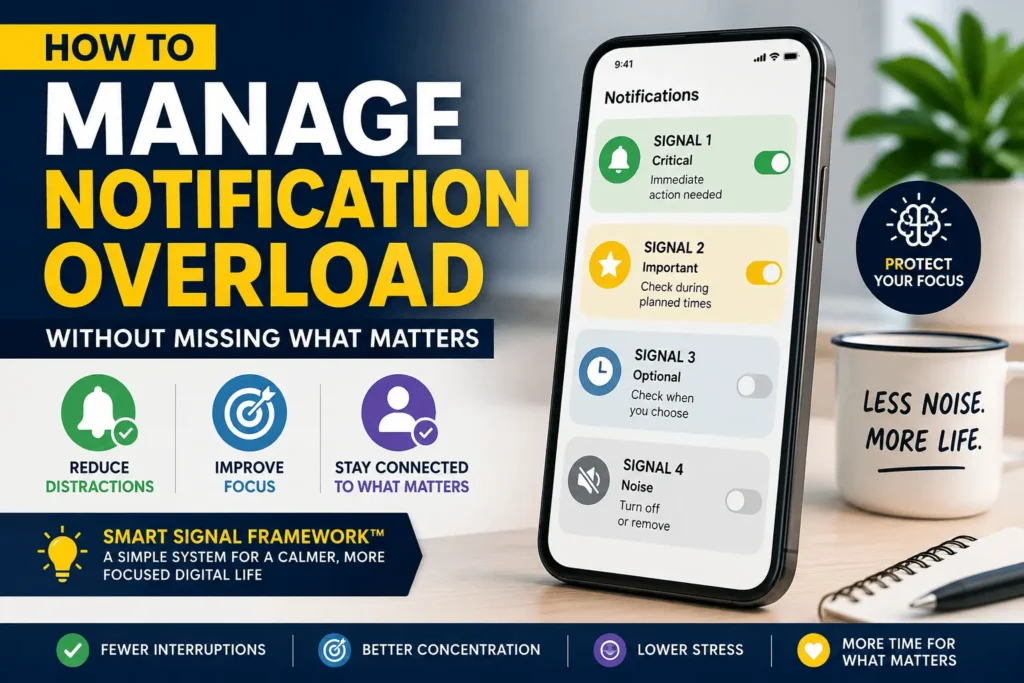
The Smart Signal Framework: A Smarter Way to Manage Notifications
In Short: Instead of asking, “Should I turn this notification off?” ask, “How important is this information?” The Smart Signal Framework helps you organize notifications into four levels based on urgency and value, making it easier to stay informed without being constantly interrupted.
Many people approach notification management the wrong way.
They sit down with their phone and start switching notifications on and off, one app at a time. A few minutes later, they become unsure.
“Maybe I should leave this one on.”
“What if I need this later?”
“I’ll just keep it for now.”
Before long, nothing has really changed.
The problem isn’t that there are too many settings. The problem is that there’s no clear way to decide which notifications deserve your attention.
That’s where the Smart Signal Framework comes in.
Instead of thinking about apps, think about signals.
Every notification is trying to communicate something. Your job isn’t to respond to all of them—it’s to decide which signals deserve an immediate response and which can wait.
The Four Signal Levels
Imagine your notifications as four baskets. Every alert belongs in one of them.
Once you understand these categories, managing notifications becomes much simpler.
🟢 Signal 1 — Critical
These notifications deserve your immediate attention.
If you miss one of these, there could be real consequences.
Typical examples include:
- Emergency calls from close family members
- Banking fraud or suspicious login alerts
- Security system notifications
- Medical appointment reminders on the day of the appointment
- School emergency alerts
- Two-factor authentication (2FA) codes when you’re logging in
- Severe weather warnings (if relevant to your area)
Ask Yourself
Would ignoring this notification for several hours create a serious problem?
If the answer is yes, it belongs in Signal 1.
Best Practice
Keep sound or vibration enabled, but only for truly critical alerts.
If everything feels urgent, nothing really is.
🔵 Signal 2 — Important
These notifications matter, but they don’t require an instant response.
You’ll probably want to see them the same day, but they rarely need to interrupt what you’re doing.
Examples include:
- Work messages
- Team collaboration apps
- Calendar reminders
- Messages from teachers or schools
- Personal email from important contacts
- Appointment confirmations
- Delivery notifications for expected packages
Ask Yourself
Will this still be useful if I check it during my next scheduled break?
If yes, it belongs here.
Best Practice
Allow these notifications to appear quietly, or review them during dedicated check-in times.
🟡 Signal 3 — Useful
These notifications provide helpful information, but they aren’t time-sensitive.
Examples include:
- Utility bill reminders
- Subscription renewal notices
- Weather updates for tomorrow
- Loyalty program updates
- Package progress updates after dispatch
- Monthly account summaries
- Travel itinerary reminders
Missing one of these for a few hours usually doesn’t matter.
Ask Yourself
Does this notification help me, even if I don’t see it immediately?
If yes, it belongs here.
Best Practice
Keep these silent and review them once or twice a day.
⚪ Signal 4 — Noise
These notifications demand attention without adding meaningful value.
Examples include:
- Social media likes
- New followers
- Game rewards
- Shopping promotions
- Flash sales
- Breaking celebrity news
- “Trending now” alerts
- Suggested videos
- Daily streak reminders
- Random app engagement notifications
These alerts are designed to bring you back into the app—not necessarily to improve your day.
Ask Yourself
If I never saw this notification, would my day be any worse?
If the honest answer is no, it belongs in Signal 4.
Best Practice
Turn these notifications off completely.
If you still enjoy the app, open it when you choose—not when it interrupts you.
A Simple Notification Classification Table
Before changing any settings, classify your notifications using this table.
| Signal | Urgency | Examples | Recommended Action |
|---|---|---|---|
| Signal 1 – Critical | Immediate | Emergency calls, fraud alerts, security warnings, medical reminders | Keep notifications, sound, and vibration enabled |
| Signal 2 – Important | Same day | Work messages, calendar events, school updates | Keep notifications, but minimize interruptions where possible |
| Signal 3 – Useful | Low | Delivery updates, bills, travel reminders | Silent notifications or scheduled review |
| Signal 4 – Noise | None | Social media likes, promotions, gaming alerts, marketing notifications | Turn off completely |
Don’t worry about getting every app “perfect.” Focus on the type of information each app sends. For example, a messaging app might belong in Signal 1 for a close family group but Signal 2 for work chats, depending on how you use it.
Four Real-Life Examples
Example 1: Sarah, a Parent
Sarah wants to stay available for her children’s school and family but feels overwhelmed by constant phone activity.
After using the Smart Signal Framework:
- School emergency alerts → Signal 1
- Family group chat → Signal 2
- Grocery app offers → Signal 4
- Shopping promotions → Signal 4
- Package tracking → Signal 3
She still receives important updates but no longer feels compelled to check every buzz.
Example 2: David, a Remote Worker
David receives dozens of Slack, email, and project notifications every hour.
He changes his system:
- Manager messages → Signal 2
- Calendar reminders → Signal 2
- Software update alerts → Signal 3
- Marketing emails → Signal 4
Instead of reacting all day, he reviews non-urgent work notifications during planned intervals.
Example 3: Mia, a University Student
Mia often loses focus while studying because of social media and group chats.
She reorganizes her phone:
- Class announcements → Signal 2
- Exam reminders → Signal 1
- Social media likes → Signal 4
- Streaming app recommendations → Signal 4
She studies with fewer interruptions while still seeing important academic updates.
Example 4: Raj, a Small Business Owner
Raj runs his business from his phone and initially believes every notification is important.
After reviewing them carefully:
- Customer inquiries → Signal 2
- Payment confirmations → Signal 2
- Banking fraud alerts → Signal 1
- Promotional app notifications → Signal 4
He realizes that most interruptions were not helping him serve customers—they were simply competing for his attention.
The Biggest Mistake People Make
Many people organize notifications by app.
Instead, organize them by importance.
The same app can send different kinds of notifications.
For example, your email app might contain:
- A password reset request (Signal 1)
- A message from your manager (Signal 2)
- A monthly newsletter (Signal 3)
- A marketing promotion (Signal 4)
Thinking in terms of signals—not apps—helps you make smarter decisions.
Your 5-Minute Smart Signal Audit
Before moving to the next section, spend just five minutes reviewing your notifications.
For each app, ask yourself:
- What type of information does this app usually send?
- Would ignoring these notifications for a few hours cause a real problem?
- Does this app help me achieve my goals, or mostly distract me?
- Can I check this information intentionally instead of being interrupted?
- Which Signal level does this app—or even specific notifications within it—belong to?
You don’t need to finish your entire phone today. Even reviewing your 10 most frequently used apps can noticeably reduce daily interruptions.
SmartHelpHub Tip
Your phone should interrupt your life only for things that truly deserve your attention. Everything else can wait until you choose to look.
That’s the core idea behind the Smart Signal Framework.
It’s not about using your phone less—it’s about using your attention more intentionally.
How to Reduce Notification Overload Without Missing What Matters
In Short: Managing notifications isn’t about turning everything off overnight. It’s about making small, intentional changes that reduce unnecessary interruptions while keeping truly important information easy to find.
Now that you’ve sorted your notifications using the Smart Signal Framework, it’s time to put that system into practice.
You don’t need to spend hours changing every setting on your phone. Start with a few high-impact changes, use them for a week, and adjust as needed. A system that fits your daily life is far more effective than one that’s too strict to maintain.
Let’s walk through the process step by step.
Step 1: Audit Your Current Notifications
Before changing anything, take a few minutes to understand what you’re dealing with.
Open your phone’s notification settings and scroll through the list of apps that are allowed to send alerts.
Ask yourself these questions for each app:
- What type of notification does this app send?
- How often do I actually act on these alerts?
- Have I opened this app because of a notification in the past month?
- Would I notice if these notifications disappeared?
You’ll probably discover apps you forgot were even sending notifications.
Example
You installed a travel app last year and no longer use it, but it still sends weekly offers.
That’s an easy candidate for Signal 4.
SmartHelpHub Tip
Don’t start by deleting apps. Simply understanding your current notification habits often reveals quick wins without making major changes.
Step 2: Turn Off Notifications You Never Use
This is the easiest way to reduce digital noise.
If a notification never changes your behavior, it doesn’t need to interrupt you.
Common examples include:
- Shopping promotions
- Daily deal alerts
- Game rewards
- Social media engagement notifications
- Suggested content
- “We miss you” messages
- News alerts that repeat the same story throughout the day
If you still enjoy these apps, keep using them—but on your schedule, not theirs.
A Helpful Rule
If you’ve ignored the same type of notification several times in a row, it’s probably safe to turn it off.
Step 3: Customize Notifications Instead of Accepting the Default
Many people don’t realize that apps often let you choose which notifications you receive.
Instead of allowing every alert, look for options to disable only the ones you don’t need.
For example, a messaging app may allow you to keep:
- Direct messages
- Mentions
- Calls
While turning off:
- Group activity
- Reaction notifications
- Suggested contacts
- Promotional announcements
The goal isn’t to silence the app—it’s to make it work for you.
SmartHelpHub Tip
Whenever you install a new app, review its notification settings before tapping “Allow.” A few minutes of setup can prevent months of unnecessary interruptions.
Step 4: Replace Constant Checking with Scheduled Check-Ins
One of the biggest productivity mistakes is responding to every notification as soon as it appears.
Instead, create dedicated times to review non-urgent information.
For example:
- Email: every few hours instead of every few minutes.
- Team chat: during natural breaks between tasks.
- Social media: once or twice a day.
- Shopping apps: only when you’re planning to make a purchase.
This simple habit reduces interruptions without causing you to miss important updates.
Example Daily Check-In Schedule
| Time | What to Review |
|---|---|
| Morning | Calendar, family messages, work priorities |
| Midday | Email, team messages, delivery updates |
| Afternoon | Non-urgent notifications |
| Evening | Personal messages, reminders for tomorrow |
Your schedule doesn’t need to be rigid. The goal is to move from reacting automatically to checking intentionally.
Pairing scheduled notification check-ins with a daily to-do list that you’ll actually follow can make it much easier to stay focused throughout the day.
Step 5: Use Focus Modes with a Purpose
Features like Focus Mode and Do Not Disturb can be helpful—but only when they’re used thoughtfully.
Rather than enabling them all day, match them to specific situations.
For example:
During Deep Work
Allow:
- Emergency contacts
- Calendar reminders
Silence:
- Social media
- Shopping apps
- Games
- Non-urgent emails
During Family Time
Allow:
- Close family
- Emergency alerts
Silence:
- Work notifications
- News alerts
- Promotional messages
During Sleep
Allow:
- Emergency contacts (if needed)
- Critical security alerts
Silence everything else.
Using different notification profiles throughout the day helps your phone support your priorities instead of disrupting them.
Step 6: Reduce Visual Clutter
Notification overload isn’t only about sounds and vibrations.
Visual reminders also compete for your attention.
Consider reducing:
- Badge icons showing unread counts.
- Lock screen previews for non-essential apps.
- Constant notification banners.
- Persistent alerts that stay on your screen.
When your phone looks calmer, you’re less likely to unlock it out of habit.
SmartHelpHub Tip
Seeing “127 unread notifications” isn’t motivating—it often creates stress. Clear unnecessary badges and let your home screen work for you instead of against you.
Step 7: Create Different Rules for Work and Personal Life
One notification system rarely works for every situation.
Ask yourself:
- Which notifications help me during work hours?
- Which notifications matter after work?
- What can wait until tomorrow?
For example:
Work Hours
- Work chat → On
- Calendar → On
- Social media → Off
- Shopping apps → Off
Evenings
- Family → On
- Personal messages → On
- Work email → Silent
- News apps → Off
This simple boundary helps reduce the feeling that work follows you everywhere.
Step 8: Review Your Notification Settings Regularly
Your notification system isn’t something you set once and forget.
Apps change.
New features appear.
Permissions get updated.
You install new apps.
Set a reminder once a month to spend five minutes reviewing your notification settings.
Ask yourself:
- Am I still using this app?
- Are these notifications still helpful?
- Have new alerts been added?
- Does this still fit the Smart Signal Framework?
A monthly review keeps your system aligned with your current priorities.
Putting It All Together
Here’s what the process looks like:
- Audit every app.
- Remove notifications you never use.
- Customize the alerts that remain.
- Check non-urgent notifications intentionally instead of instantly.
- Use Focus Mode based on your activity.
- Reduce visual distractions.
- Separate work and personal notification rules.
- Review your settings once a month.
Notice that none of these steps require you to disconnect completely.
Instead, they help you become more selective about when your attention is interrupted and why.
A Simple Before-and-After Example
Imagine Priya, a marketing professional.
Before
- Every email triggered an alert.
- Social media notifications appeared all day.
- Shopping apps sent flash sale messages.
- Group chats interrupted meetings.
- Her phone buzzed more than 100 times a day.
She felt busy, but struggled to finish important work.
After Applying the Smart Signal Framework
- Banking and family alerts remained active.
- Work messages arrived quietly and were checked during planned breaks.
- Promotional notifications were turned off.
- Social media was checked once in the evening.
- Badge icons were removed from most apps.
Her phone still kept her informed—but it stopped controlling her attention.
The number of interruptions dropped dramatically, and she no longer felt pressured to react to every alert immediately.
SmartHelpHub Action Challenge
Choose just three apps today.
For each one:
- Decide which Signal level it belongs to.
- Remove any notifications you don’t find useful.
- Check whether the remaining alerts match your priorities.
Small changes are easier to maintain than a complete digital overhaul, and they often deliver noticeable results within a few days.
Common Notification Mistakes That Keep You Feeling Overwhelmed
In Short: Most people don’t struggle because they have the “wrong” notification settings. They struggle because they make changes that are difficult to maintain. Avoiding these common mistakes will help you build a system that lasts.
It’s easy to become frustrated with constant interruptions and make dramatic changes. You might silence every app, enable every focus feature, or promise yourself you’ll check your phone only twice a day.
While these ideas sound productive, they’re often difficult to maintain.
A better approach is to make thoughtful adjustments that match your daily life.
Here are the most common mistakes—and what to do instead.
Mistake 1: Turning Off Every Notification
When notification overload becomes overwhelming, some people take an all-or-nothing approach.
They disable every alert and hope the problem disappears.
For a day or two, this can feel refreshing.
Then reality sets in.
You miss a message from a family member, forget an appointment, or overlook an important work update. To avoid missing something again, you switch every notification back on—and you’re right back where you started.
A Better Approach
Keep Signal 1 (Critical) notifications active.
Review Signal 2 (Important) notifications at planned intervals.
Silence or remove Signal 3 and Signal 4 alerts that don’t require immediate attention.
You’re not trying to become unreachable. You’re trying to become intentional.
Mistake 2: Treating Every App the Same
Not all apps deserve equal access to your attention.
Your banking app and your favorite shopping app don’t serve the same purpose.
Neither should your notification settings.
A Better Approach
Ask:
“What role does this app play in my life?”
A weather app may be critical during storm season but less important the rest of the year.
A work messaging app might need notifications during office hours but not during family dinner.
Let your priorities—not the app’s defaults—guide your decisions.
Mistake 3: Ignoring Notification Permissions When Installing New Apps
Most apps ask for notification permission the first time you open them.
Many of us tap “Allow” without thinking.
Months later, those apps are still sending reminders, promotions, and updates we no longer need.
A Better Approach
Before granting permission, ask yourself:
- Will these notifications help me?
- Would I open this app without a reminder?
- Can I check it when I choose instead?
If you’re unsure, it’s usually easier to start with notifications turned off and enable only the ones you truly value later.
Mistake 4: Checking Every Buzz or Vibration
Sometimes the notification itself isn’t the problem.
The habit is.
Even if the alert isn’t important, your brain has learned to respond automatically.
Over time, this creates a cycle:
Notification → Check phone → Lose focus → Return to task → Repeat.
Breaking that cycle starts with adding a small pause.
A Better Approach
The next time your phone buzzes, ask yourself:
“Do I need to check this right now, or can it wait until my next check-in?”
A five-second pause is often enough to stop an automatic habit from taking over.
Mistake 5: Leaving Badge Icons Everywhere
Those small red circles with unread counts may seem harmless.
In reality, they constantly remind you that something is waiting.
When dozens of apps display unread badges, your home screen becomes a collection of unfinished tasks.
For many people, this creates low-level stress throughout the day.
A Better Approach
Keep badges only for apps where unread information genuinely matters.
For example:
Useful
- Messages
- Calendar
- Banking (if available)
Usually unnecessary
- Shopping
- Games
- Entertainment
- Social media
A cleaner home screen often feels calmer before you even unlock your phone.
Mistake 6: Using the Same Notification Settings Every Day
Your priorities change throughout the week.
Workdays look different from weekends.
A vacation feels different from a busy Monday.
Yet many people use exactly the same notification settings all the time.
A Better Approach
Adjust your notifications to match your context.
For example:
Work Hours
- Team communication → On
- Social media → Off
Evening
- Family → On
- Work chat → Silent
Vacation
- Travel updates → On
- Work notifications → Mostly Off
Your phone should adapt to your life—not the other way around.
Mistake 7: Expecting Instant Results
Many people assume they’ll feel calmer the moment they reduce notifications.
But if you’ve spent years responding immediately to alerts, your habits won’t change overnight.
During the first few days, you may still reach for your phone out of habit—even when it hasn’t buzzed.
That’s completely normal.
A Better Approach
Give yourself a week to adjust.
Pay attention to questions like:
- Am I checking my phone less often?
- Am I finishing tasks more easily?
- Do I feel less mentally scattered?
Progress matters more than perfection.
The 15-Minute Notification Reset
In Short: You don’t need to spend an entire afternoon reorganizing your phone. In just 15 minutes, you can remove many of the biggest sources of digital distraction.
If you’re not sure where to begin, use this simple reset.
Set a timer, follow the steps below, and stop when the timer ends.
You can always continue another day.
Minutes 1–3: Identify Your Biggest Interruptions
Open your notification settings.
Look at the apps that send you alerts most often.
Without changing anything yet, ask:
- Which app interrupts me the most?
- Which notifications have I ignored repeatedly?
- Which ones actually help me?
Choose your top three sources of distraction.
Minutes 4–6: Remove the Noise
Turn off notifications for apps that rarely provide useful information.
Start with:
- Shopping apps
- Games
- Promotional emails
- Entertainment apps
- Social media engagement alerts
If you’re unsure about an app, you can always revisit it later.
Remember: this isn’t permanent. It’s an experiment to see what improves your day.
Minutes 7–10: Protect What Matters
Review your important notifications.
Make sure alerts remain enabled for things like:
- Close family
- Emergency contacts
- Banking security
- Calendar reminders
- Essential work communication
The goal isn’t fewer notifications at any cost—it’s the right notifications.
Minutes 11–15: Create Your First Check-In Routine
Decide when you’ll intentionally review non-urgent notifications.
For example:
- Before starting work
- Around lunchtime
- Before finishing the workday
- Once in the evening
You don’t need a perfect schedule.
Consistency is more valuable than complexity.
A Simple Weekly Challenge
Instead of trying to organize every app today, focus on steady improvement.
Day 1
Review your messaging apps.
Day 2
Review email notifications.
Day 3
Review social media.
Day 4
Review shopping and delivery apps.
Day 5
Review entertainment and news apps.
Day 6
Test your new notification routine.
Day 7
Reflect on what worked and make small adjustments.
By spreading the process across a week, you’re more likely to build habits that last.
Your Personal Notification Audit Checklist
Use this checklist whenever you install a new app or review your settings.
Before You Keep a Notification Enabled, Ask:
- □ Does this notification help me take meaningful action?
- □ Would missing it for a few hours create a real problem?
- □ Am I keeping it because it’s useful—or because I’m afraid to turn it off?
- □ Can I check this information intentionally instead?
- □ Does this notification fit Signal 1, 2, or 3—or is it really Signal 4?
- □ Will this notification improve my day more often than it interrupts it?
If you answer “no” to most of these questions, it’s probably safe to silence or disable that notification.
SmartHelpHub Tip
Don’t aim for a silent phone. Aim for a meaningful one.
A phone that interrupts you only when it truly needs your attention is far more valuable than one that either demands constant attention or stays completely silent.
Build Notification Habits That Last
In Short: The best notification system isn’t the one with the fewest alerts—it’s the one that supports your daily life without constantly interrupting it. Small habits make your settings sustainable over time.
You’ve cleaned up your notifications, organized them using the Smart Signal Framework, and removed many unnecessary interruptions.
Now comes the most important part: keeping those improvements.
Without a few simple habits, it’s easy for notification overload to slowly return. New apps ask for permission, existing apps introduce new alerts, and before long your phone is buzzing as often as it did before.
The good news is that maintaining a healthy notification system takes far less effort than creating one.
Start Your Day Before Checking Notifications
The first few minutes after you wake up often shape the rest of your day.
If the first thing you see is a screen full of emails, social media updates, and breaking news, your attention immediately shifts toward reacting instead of choosing your priorities.
Try creating a small buffer between waking up and checking your phone.
For example, you might:
- Drink a glass of water.
- Stretch for a few minutes.
- Review your daily plan.
- Eat breakfast.
- Step outside for fresh air.
Even waiting just 15–30 minutes before checking non-urgent notifications can help you start the day with greater focus. If you’re looking to create a calmer start to your mornings, our guide on How to Build a Simple Morning Routine That Actually Works shares practical ideas that pair well with these notification habits.
Give Yourself Permission Not to Respond Immediately
One of the biggest myths about modern communication is that every message deserves an instant reply.
In reality, very few notifications require an immediate response.
A colleague’s question, a friend’s message, or a promotional email can often wait until your next planned check-in.
Instead of asking:
“How quickly can I respond?”
Try asking:
“When is the right time to respond?”
That small change in mindset helps you stay in control of your attention.
Match Your Notifications to Your Priorities
Your notification settings should reflect what’s important in your life—not what every app wants you to notice.
For example:
If you’re working
Prioritize:
- Calendar reminders
- Team communication
- Important client messages
Reduce:
- Entertainment
- Shopping
- Social media
If you’re studying
Prioritize:
- Class announcements
- Assignment reminders
- Study apps
Reduce:
- Group chats that aren’t related to your coursework
- Streaming notifications
- Gaming alerts
If you’re spending time with family
Prioritize:
- Close family contacts
- Emergency alerts
Reduce:
- Work notifications
- Promotional messages
- News updates
Your phone should support the activity you’re doing instead of competing with it.
Create Technology-Free Moments
You don’t need an entire weekend without technology to benefit from fewer interruptions.
Small technology-free moments can be just as valuable.
Consider setting aside time during:
- Meals
- Family conversations
- Exercise
- Reading
- Creative hobbies
- Your bedtime routine
Creating regular screen-free moments is one of the simplest ways to build healthier digital habits and improve your ability to focus.
These moments remind your brain that not every quiet moment needs to be filled by checking a screen.
Review New Apps Carefully
Every new app wants your attention.
Before tapping “Allow Notifications,” pause for a moment.
Ask yourself:
- Will these notifications genuinely help me?
- Could I use this app effectively without alerts?
- If I enable notifications, which types do I actually need?
Starting with fewer permissions is often easier than trying to remove dozens of unnecessary notifications later.
Notice How Your Attention Feels
Many people track steps, calories, or screen time.
Few people notice how their attention feels.
Once a week, ask yourself:
- Did my phone interrupt me less this week?
- Did I finish tasks more easily?
- Did I spend less time switching between apps?
- Did I feel calmer during the day?
These questions help you measure progress beyond simply counting notifications.
Signs Your Notification System Is Working
In Short: Success isn’t measured by having zero notifications. It’s measured by feeling more in control of your attention while still staying connected to what matters.
You don’t need to achieve a perfectly organized phone.
Instead, look for small changes that make everyday life feel easier.
Here are some signs your new system is working.
You Check Your Phone More Intentionally
Instead of unlocking your phone every few minutes, you begin checking it because you’ve chosen to, not because every alert demands your attention.
This shift from reacting to deciding is one of the biggest improvements you can make.
You Finish More Tasks Without Interruptions
Whether you’re working, studying, or doing household chores, you notice that you’re able to stay focused for longer periods.
You don’t have to restart your thinking every time your phone lights up.
Even small improvements in concentration can make your day feel more productive.
You Feel Less Mentally Cluttered
Many people describe notification overload as feeling like they have dozens of unfinished conversations happening at once.
As unnecessary alerts disappear, your mind often feels calmer too.
You may still have the same responsibilities—but fewer constant reminders competing for your attention.
You Stop Feeling Pressured to Respond Instantly
Not every message needs an immediate reply.
As your habits improve, you become more comfortable responding during planned check-in times instead of interrupting every task.
Most people won’t even notice the difference.
You Rarely Miss Important Information
One common fear is:
“If I reduce notifications, I’ll miss something important.”
A well-designed notification system proves the opposite.
Because only meaningful alerts remain, important messages become easier—not harder—to notice.
Your Phone Feels Like a Tool Again
Perhaps the biggest sign of success is this:
Your phone starts serving your goals instead of constantly pulling you away from them.
You still enjoy technology.
You still stay connected.
But you’re making more of the decisions about when and how you engage with it.
That’s the real purpose of managing notification overload.
A Final Reflection
Take a moment to think about how your phone fits into your daily life today.
Ask yourself:
- Which notifications genuinely improve my life?
- Which ones simply compete for my attention?
- If my phone interrupted me only for things that truly mattered, how would my day feel different?
You don’t have to answer these questions perfectly.
Simply asking them helps shift your mindset from automatic reactions to intentional choices.
And that’s where lasting change begins.
SmartHelpHub Tip
Attention is one of your most valuable resources. Every notification that reaches you should earn the right to interrupt it.
When you protect your attention, you’re not just reducing distractions—you’re making more room for meaningful work, better conversations, and a calmer day.
Frequently Asked Questions
These FAQs target real search queries while helping readers who may have skipped directly to the bottom of the guide.
Should I turn off all notifications?
No. Turning off every notification can cause you to miss genuinely important information, such as emergency calls, banking security alerts, medical reminders, or time-sensitive work updates.
Instead, keep only the notifications that provide real value. The Smart Signal Framework can help you decide which alerts deserve immediate attention, which can wait, and which can be turned off completely.
How many notifications are too many?
There’s no universal number because notification overload depends more on quality than quantity.
Someone might receive 80 carefully managed notifications each day without feeling overwhelmed, while another person feels distracted by 30 poorly managed alerts.
Instead of counting notifications, ask yourself:
Do they interrupt my focus?
Do I usually act on them?
Would I miss them if they disappeared?
If most notifications don’t change your actions, it’s probably time to review your settings.
Can too many notifications increase stress?
Yes. Frequent interruptions can make it harder to concentrate, create a sense of mental clutter, and leave you feeling like you’re constantly reacting instead of making intentional choices.
While notifications aren’t the only source of stress, reducing unnecessary interruptions can help create a calmer and more focused daily routine.
What notifications should always stay on?
Every person’s needs are different, but these are often worth keeping enabled:
Emergency calls from close family or trusted contacts
Banking security or fraud alerts
Calendar reminders for important appointments
Two-factor authentication (2FA) codes when needed
School or childcare emergency updates
Critical work notifications, if your role requires them
Review these regularly to make sure they still match your priorities.
Is Do Not Disturb enough to solve notification overload?
Not by itself.
Do Not Disturb is useful for protecting your focus during meetings, sleep, or deep work, but it doesn’t decide which notifications deserve your attention in the first place.
For the best results, combine Focus Mode or Do Not Disturb with a thoughtful notification system like the Smart Signal Framework.
How often should I review my notification settings?
A quick monthly review is usually enough.
Take five minutes to ask yourself:
Am I still using this app?
Are these notifications still useful?
Have new notification types been added?
Do these alerts still fit my priorities?
Regular reviews help prevent unnecessary notifications from slowly building up again.
Why do I still check my phone even when there aren’t any notifications?
Checking your phone can become a habit that’s triggered by boredom, curiosity, or routine rather than notifications themselves.
If you notice yourself unlocking your phone automatically, try creating small pauses before reaching for it and replacing that habit with a more intentional action, such as taking a short walk, stretching, or returning to your current task.
Over time, those small pauses can help break the automatic checking cycle.
Can I reduce notifications without missing work messages?
Yes. The goal isn’t to ignore work—it’s to organize it.
For example, you might:
Keep messages from your manager or key teammates enabled.
Silence low-priority channels.
Review email and team chat at scheduled intervals.
Use Focus Mode during deep work while allowing urgent contacts through.
This approach helps you stay responsive without being interrupted every few minutes.
Key Takeaways
If you remember only a few ideas from this guide, let them be these:
- Notification overload isn’t just about the number of alerts—it’s about how often they interrupt your attention.
- You don’t need to silence every notification to feel more focused.
- Use the Smart Signal Framework to separate critical alerts from everyday noise.
- Remove notifications that rarely lead to meaningful action.
- Check non-urgent notifications intentionally instead of reacting immediately.
- Review your notification settings regularly as your needs change.
- Protecting your attention is an ongoing habit, not a one-time task.
Small changes, repeated consistently, often have a bigger impact than dramatic digital detoxes.
Final Thoughts
Your phone is one of the most useful tools you own.
It helps you stay in touch with the people you care about, manage your schedule, access important information, and navigate daily life.
But when every app competes for your attention, it’s easy for that helpful tool to become a constant source of interruption.
The good news is that you don’t have to choose between being connected and being focused.
By applying the Smart Signal Framework, making thoughtful changes to your notification settings, and building simple habits around when you check your phone, you can reduce digital noise without losing touch with what truly matters.
Don’t feel like you need to reorganize everything today.
Start with one app.
Then another.
Small improvements add up, and before long you’ll notice something important:
Your phone will interrupt you less, your attention will feel less scattered, and you’ll have more time and mental space for the people, projects, and moments that matter most.
If reducing notifications is only one part of your goal, you may also benefit from learning how to stop overthinking at night and sleep peacefully, especially if digital distractions affect your ability to unwind.
That’s not just better notification management—it’s a healthier relationship with technology.
Try This Today
Before you close this guide, spend just five minutes on one simple task:
- Open your phone’s notification settings.
- Choose one app that sends frequent alerts.
- Ask yourself which Smart Signal level it belongs to.
- Turn off one notification you never act on.
That’s it.
You don’t need to create a perfect system overnight.
One intentional change today can make tomorrow a little quieter, a little more focused, and a little less overwhelming.